Skip to Content

Ask your own numbers.

You already think with ChatGPT or Claude. Your numbers live in Odoo. Connect the two and ask: sales this month, late purchase orders, stock on hand, overdue invoices. The answer comes from your live data, read-only, logged in your Odoo, and you can switch it off in one click.

This is not the AI built into Odoo 19. That one works inside Odoo; this one brings your Odoo into the assistant you already use, on Odoo 18 or 19.

What you can ask.

  • What are my sales this month, and how do they compare with last month?
  • Which purchase orders are late?
  • What is in stock for this product, and where?
  • Who are my top ten customers this year?
  • Which invoices are overdue, and for how much?
  • Which manufacturing orders are planned this week?
  • Draft an email to my team with this week's sales figures.
  • Show me sales by month as a chart.

Plain questions, in your own words. Claude can turn an answer into a chart, ChatGPT into a table or a short analysis. Each answer is read from your Odoo at the moment you ask, within what the connector's account is allowed to see.

One question, start to finish.

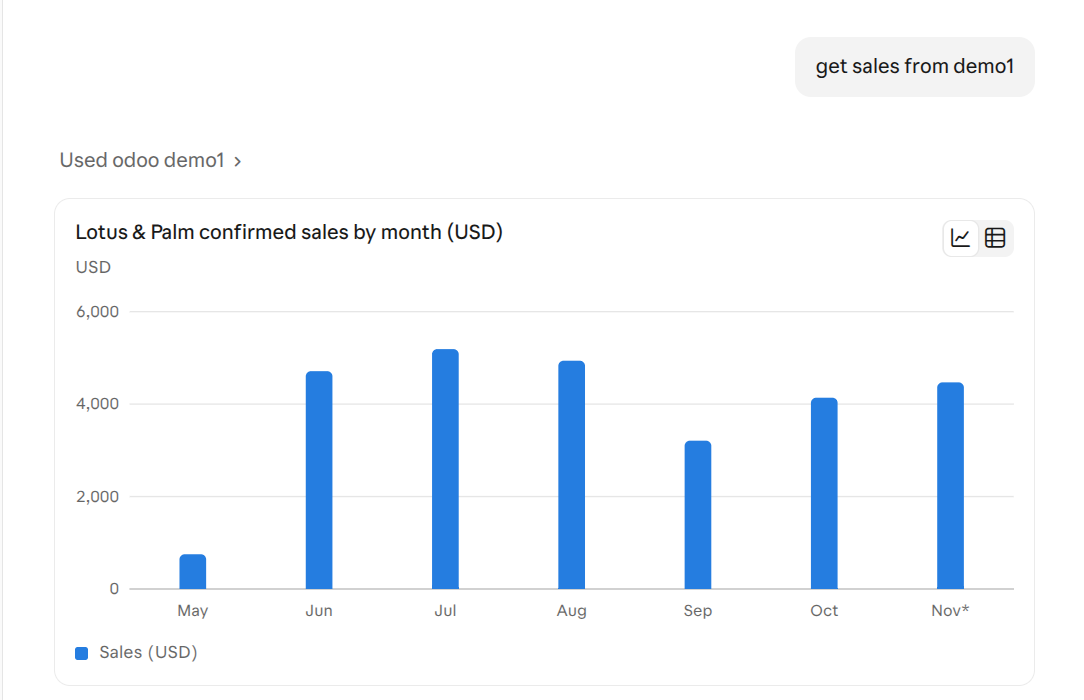
Claude asked for sales from the demo Odoo, with a bar chart of confirmed sales by month

1. You ask

In Claude: "get sales from demo1". Claude calls the Odoo connector and draws confirmed sales by month.
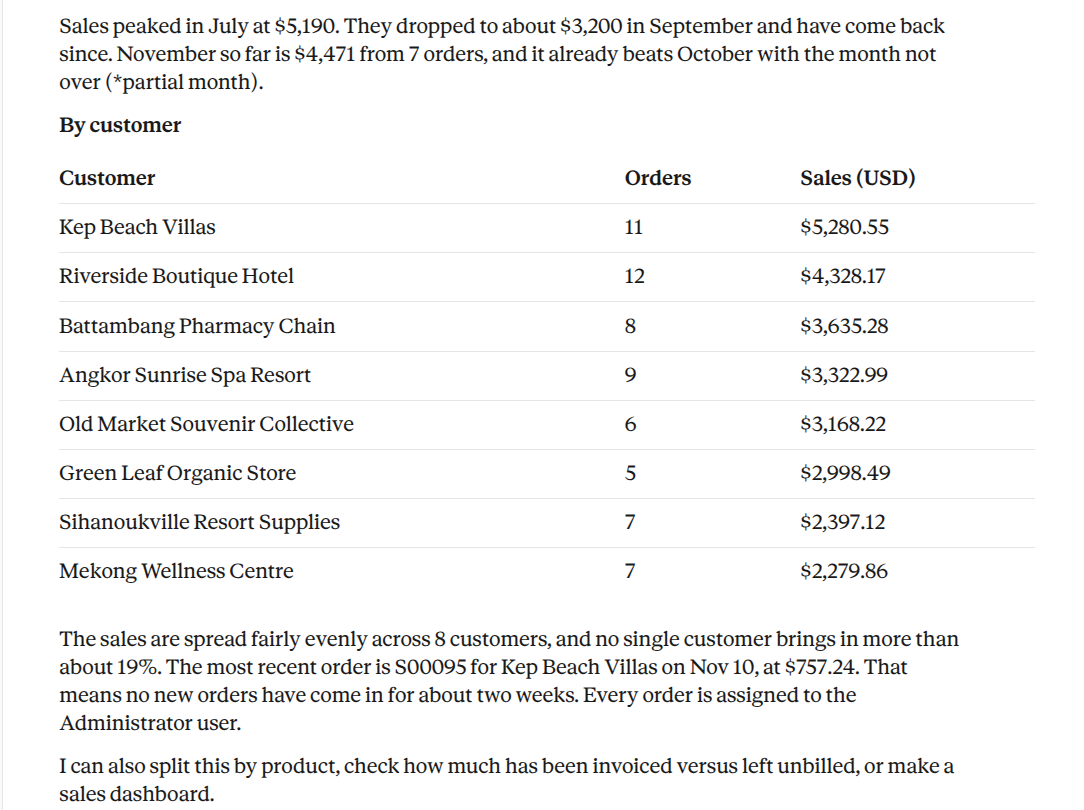
Claude's answer: the trend in words and sales by customer, from the demo Odoo

2. It answers from Odoo

The trend in words and the sales by customer, read from the live data at the moment of the question.

Audit log, in the demo Odoo · 24 Nov 2026 · read-only connector account
11:22:07odoo_aggregate · sale.order · success
11:22:09odoo_search_read · sale.order · success
11:22:11odoo_aggregate · sale.order · success

3. Your Odoo keeps the record

Each read is logged in your own Odoo: when, which tool, which data, and whether it was accepted. Extract shown.

Click a screen to see it full size. Real screens from a test on 24 Nov 2026, on our demo Odoo with an invented company, Lotus & Palm. No client data.

How it works.

Your ChatGPT or Claude

The account you already pay for. You add your Odoo once, as a connector.

→
Your Odoo on Innolabs Cloud

At yourcompany.innolabs.sh. A dedicated, read-only Odoo account answers, with the rights you chose.

→
The log, in your Odoo

Every request: who, which tool, which data, accepted or refused. In your database and your backups.

What it never does.

Change your dataThe key cannot create, edit or delete anything. A write is refused on the server, whatever the assistant is asked.
See past its accountIt sees what the Odoo account you give it can see, nothing else. Your Odoo's own access rights are the guard rails.
Copy your databaseNothing is copied into another system. Only what a question needs is read, and sent to the assistant you already use.
Switched off in one clickYour own Odoo admin archives the key, and the connection stops.
Kept within limitsEach key has a limit on requests per minute, and the log shows every one of them.

Included with Innolabs Cloud.

The connector module is part of your hosting plan, like our Cambodia modules. We set it up with you, once.

$700 set-up, one-off

Support is optional. There is no charge per question: the assistant runs on your own subscription.

Prices in US dollars, excluding 10% VAT. Not hosted with us yet? See the Innolabs Cloud plans.

What the set-up covers

  1. A dedicated read-only Odoo account, with the company and the apps you choose.
  2. The key added to your ChatGPT or Claude.
  3. The audit log switched on and checked.
  4. A test together, on your own questions.
  5. A one-page handover: what it sees, where the log is, how to switch it off.

Also with your Odoo.

Three ways to bring AI to the same data. They work side by side.

In your ChatGPT or Claude

This page. You ask from the assistant you already use, through a read-only account we set up. Odoo 18 or 19, on Innolabs Cloud. Set-up $700, then your own subscription.

Inside Odoo 19

Odoo's own AI agent, in Odoo, for every user, with each user's own rights. With our access control by document, a payroll PDF stays with the people allowed to read it. Needs Odoo 19 and your own AI key.

In Telegram

Sales, stock and unpaid invoices on the phone, and orders paid by KHQR, in Khmer and English. See the Telegram Assistant.

Before you ask.

Is this the AI built into Odoo?

No. Odoo 19 has its own AI agent: you chat with it inside Odoo, it works with each user's own rights, it can read attached documents, and it runs on an AI key you pay per question. The connector works the other way round: you stay in your ChatGPT or Claude, it reads your Odoo records through one read-only account we set up, it works on Odoo 18 as well as 19, and it runs on the subscription you already pay. The two can run side by side.

Which ChatGPT do I need?

A paid ChatGPT plan with developer mode: Plus, Pro, Business, Enterprise or Edu. On Business and Enterprise, your admin may need to allow connectors.

Does it work with Claude?

Yes, as a custom connector in Claude on the web and the desktop app, and in Claude Code. Anthropic offers custom connectors on its Free, Pro, Max, Team and Enterprise plans; the free plan allows one.

Can the AI change my data?

No. The key is read-only on the server: a request to create, change or delete something is refused, whatever the assistant is asked.

Who sees what?

Exactly what the Odoo account you give it can see. One company, the apps you choose, no HR unless you want it. You set it with us, using the same access rights your Odoo admin already knows.

Do you charge per question?

No. The assistant runs on your own ChatGPT or Claude subscription. We charge the set-up once.

Which Odoo versions?

Odoo 18 and Odoo 19, Community and Enterprise.

We are on Odoo Online.

Odoo Online does not accept custom modules on any plan, so the connector cannot run there. It runs on Odoo hosted on Innolabs Cloud, where we maintain it. We can move your Odoo to us first.

Our Odoo is on Odoo.sh or our own server.

We offer the connector only on Odoo we host, because we keep the module checked and updated for every client. Moving to Innolabs Cloud comes first; we plan the move with you.

Where do OpenAI and Anthropic come in?

The answer to your question goes to the assistant you already use. How they handle it is set by your plan and your own terms with them.

See it on your Odoo.

Tell us which ChatGPT or Claude plan you have and where your Odoo runs. We answer with what it takes, and show it working on demo data.

ChatGPT is a product of OpenAI and Claude a product of Anthropic. Innolabs is not affiliated with either. Innolabs is an Odoo Ready Partner.